ASUS ROG XBOX Ally X20 OLED Review: Peak Handheld PC Gaming


ASUS ROG XBOX Ally X20 Gaming Summary
After all that benchmarking, what's the final result? Averaging all the average FPS scores from all the games that I tested on each device paints a clear picure. There are some considerations here, though. I didn't include the tweaked performance in CS2 because most users won't see that. I also didn't account for the games that some of the handhelds couldn't run; those are noted in each case.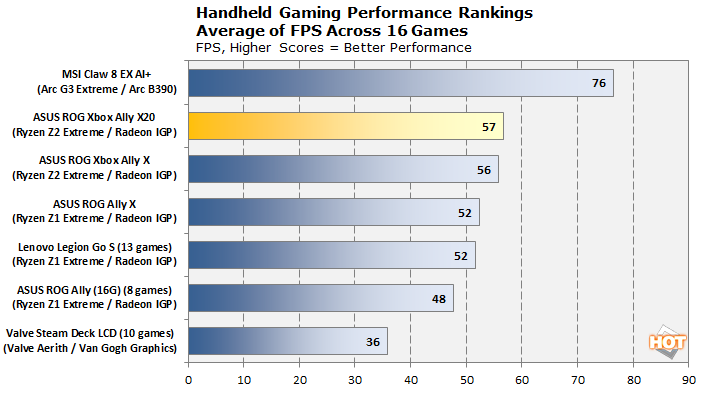
Does that make the Ryzen Z2 Extreme a poor choice? Not really. It's definitely true that the Claw 8 EX gives a better performance in every single gaming test. Whether that translates to a better experience is a matter of personal opinion and title dependent, but I can say that in a lot of the games I tested, the HDR OLED screen is a bigger upgrade than an extra 20 FPS.
When the game is already running well, more performance only does so much to improve the handheld gaming experience. All of the other handhelds use LCDs of varying quality and while most of them are quite good in a vacuum, there's just no comparison to the instant response times and perfect blacks of an OLED, and that's something that is a lot harder to quantify in a review.
ASUS ROG XBOX Ally X20 Thermal And Noise Testing
There's very little to say regarding the ASUS ROG XBOX Ally X20's thermals and noise relative to its predecessor, so I'm going to keep it brief.
This is the result of running a combination of Prime95 and Furmark for more than 20 minutes. I've usually stopped resorting to such a brutal torture test on mobile machines because they almost never have the cooling capability to handle it. This system apparently employs some kind of dark magic, because despite that the Z2 SoC was hitting its power limits the entire duration of the test, it never even breached 85°C.
If you expand the full image there's more data, but this is basically what you need to see. Now, maybe mine is a golden sample with an especially efficient SoC or an unusually good cooler mating, but based on my testing, this machine should never, ever have thermal problems. It's possible ASUS overengineered the cooling due to concerns about preserving the heat-sensitive OLED screen, but that's conjecture on my part. In any case, good job ASUS.
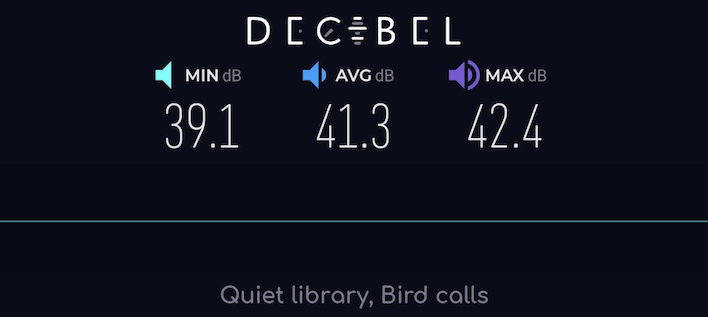
The ASUS ROG XBOX Ally X20 doesn't even get loud to achieve that kind of cooling performance. To get this result I literally attached the microphone to my face—or my glasses, anyway—while holding the machine during the torture test. The system remains very quiet under load. I'm pretty sure the 42.4-decibel maximum reading was me moving or inhaling a little too sharply one time. The ASUS ROG XBOX Ally X20 is actually so silent.
ASUS ROG XBOX Ally X20 Battery Life Benchmarks
Battery life has long been an Achilles heel for these PC gaming handhelds. Things have improved a lot since the early days of the original ROG Ally, though. Not only have we seen newer and more efficient SoCs, but software optimizations have made it possible to run games on lower and lower power budgets. Microsoft deserves some kudos here, too; the 26H2 update legitimately made me able to play games I wasn't before on the 16GB ROG Ally, and a reduction in background tasks like that also reduces idle power consumption.Anyway, before I get to the gaming battery life tests, let's take a look at the PCMark 10 Battery Video test. To determine if the HDR screen was going to blow up our power usage, I decided to benchmark it that way. Did it suck down the battery like a thirsty kid with a Capri Sun?
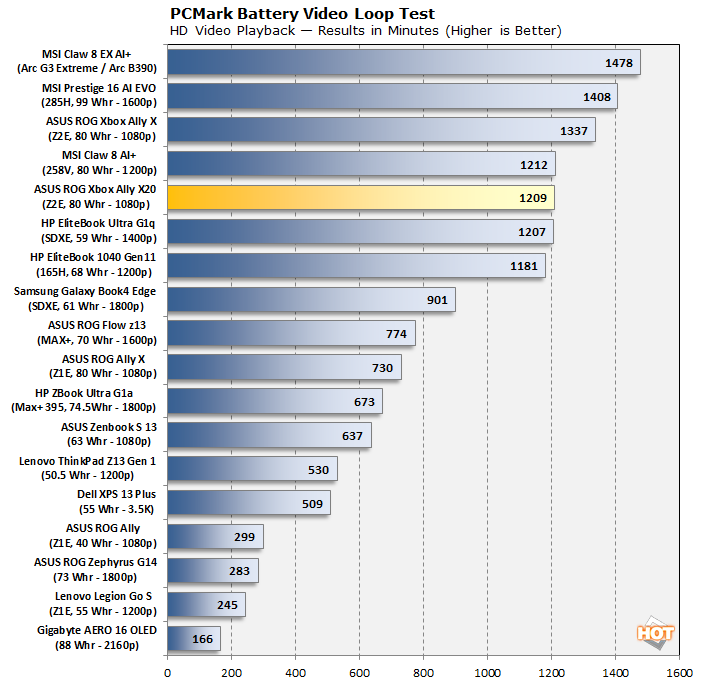
No it did not. However, it did perform a bit worse than the previous-generation Xbox Ally X. Note that while I kept HDR enabled, I did calibrate the screen to the usual 110 cd/m² here, so while highlights could exceed that quite a bit, the video that PCMark 10 plays doesn't actually use HDR. Despite that, the battery life was a bit worse, yet still exceptional at over 20 hours. What about in gaming?
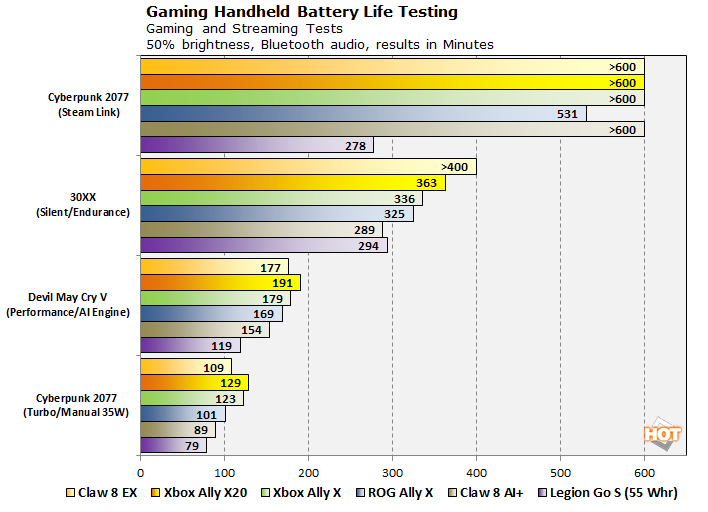
Curiously, despite doing worse in the video battery test, the ASUS ROG XBOX Ally X20 actually got slightly better results for gaming battery life. It's still not incredible—you're still going to murder the battery in 2 hours with a heavy AAA game—but it's the best we've tested yet, for the most part. MSI's newest Intel machine does seem to scale better at lower power settings, and it might be able to beat the AMD handhelds if we matched performance; these are relatively crude tests simply setting performance presets. Still, if you really want to play a PC gaming handheld for more than 3 hours at a stretch, your wrists are better than mine.
ASUS ROG XBOX Ally X20 Conclusions
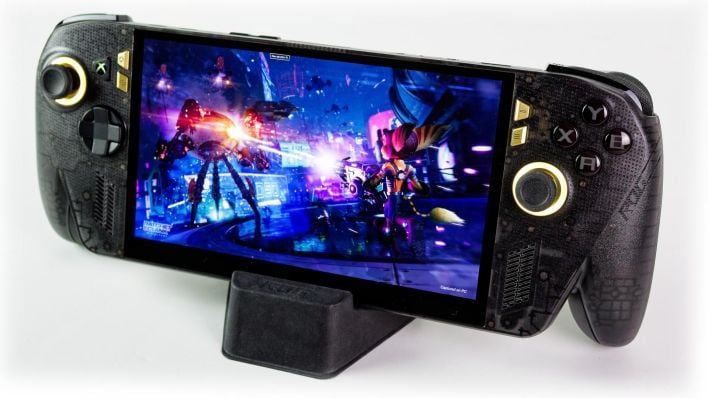
This is a tough launch for ASUS. Not only is it coming to battle with a previous-generation processor, but it's launching into a hostile market. I probably don't have to tell you what the market is like at the moment, but for posterity's sake, RAM is more than five times as expensive as it was this time last year, SSDs are double or triple, and the general economy outside of big business isn't doing great.
Despite all of that, ASUS is asking $1,299 for this system. We felt that the ROG XBOX Ally X was expensive at $999. For $300 more, you get essentially the same internals with an admittedly glorious screen upgrade, SD Express support, TMR joysticks, a fancy colorway, and a slightly faster SSD. That's basically the story. Yet, I can't help but feel impressed by ASUS in this situation. Considering the state of the market, a $300 price bump feels completely justified. Given the feature upgrades, it actually starts to seem like a good value.
But you have to consider what you're buying. This a gaming PC that runs games on integrated graphics; you can expect a max of around 40-50 FPS in most games with nice visual quality. It has 1TB of storage, and you can't add another drive internally. What kind of gaming laptop could you get for $1,200? Would it have a screen as nice as this one? The answer is 'maybe'—and while they serve different form factors, the comparison is more salient than you might think; you'll need a bag or backpack for either. You'll want to carry a charger, too.
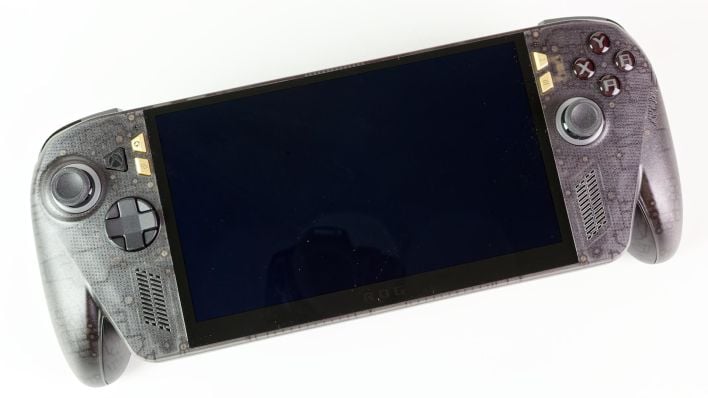
To be clear, I love this machine. It is a joy to play games on. I've never used a handheld with a proper HDR screen before. I have played on a Switch OLED and a Steam Deck OLED, and they look great, but neither one of those has the brightness necessary for really vibrant colors or bright highlights like the Ally X20's screen does. The contrast that this machine can achieve is downright awesome, and it really enhances the experience.
Whether or not pure gaming devices make sense at this price point is a question the industry is going to have to address next year if the memory shortage doesn't abate. Rumors have put the PlayStation 6 and Xbox Project Helix above this price point, and those are necessarily less capable than devices this, being that this device includes a display and is capable of serving as a regular Windows PC with a dock.
If you're someone who prefers frame rate over visual panache, you may prefer an Arc G3 Extreme-based device, but those are even more expensive. Meanwhile, if you're on the fence about the cost, I'd probably recommend stepping down to a Z1 Extreme machine. They don't have CPU core scheduling quirks like Strix Point, and they're often available refurbished or used for barely more than half of their original MSRP. But if you're comfortable spending this kind of money on a dedicated gaming device, the ASUS ROG XBOX Ally X20 is definitely one of the very best options on the market at this point in time.