AMD FSR 4.1 On Radeon RX 6000 Tested: A Stunning Visual Upgrade


As a teaser, I'll tell you that we have some integrated GPU testing on the way in our next review, but for now, we took a quick look at FSR 4.1 on the Radeon RX 6800 XT, based on the powerful Navi 21 GPU. This is a very interesting topic because FSR 4.1 is not a small upgrade over the analytical FSR 2 and FSR 3 algorithms. Like NVIDIA's DLSS, this technology uses machine learning to both smooth and upscale the game's rendered image. The final output is the result of the FSR 4.1 AI model interpreting the low-resolution input from the game.
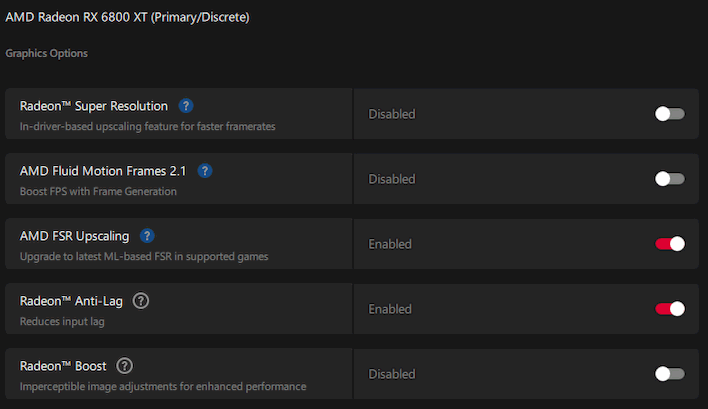
We tested FSR 4 when the Radeon RX 9000 series GPUs came out, as it was initially exclusive to those cards. Back in June it came out for the Radeon RX 7000 series, and we meant to test it thoroughly there, but time got away from the guy in charge of doing that; namely, me. If there's interest, I can produce some numbers for RDNA 3 discrete GPUs as well, but I do have some numbers from RDNA 3 and RDNA 3.5 integrated GPUs on the way soon.
Today is all about AMD's FSR 4.1 on RDNA 2, though. I used our trusty Core Ultra 9 285K test bench equipped with 200S Boost Mode and 8.6 GT/s CUDIMMs as the foundation for the reference Radeon RX 6800 XT, freshly cleaned, and with the 26.10.1 driver installed. I only tested a handful of games because frankly you'll get the idea pretty fast. Without further ado, let's get into it.
AMD FSR 4.1 on Radeon RX 6800 XT In Cyberpunk 2077

Of course, we're kicking things off with everyone's favorite benchmark. I have two separate sets of performance data here; one set is testing 3840×2160 (4K UHD) resolution on "Ultra" settings without ray-tracing, because I feel that's probably how you should play this game on RDNA 2. However, if you're addicted to physically simulated light bounces, I also tested in 2560×1440 resolution with a customized RT High preset. For that testing, I disabled ray-traced reflections and instead toggled on RT sun shadows, RT local shadows, and set RT global illumination to "Medium". Here are the performance results:
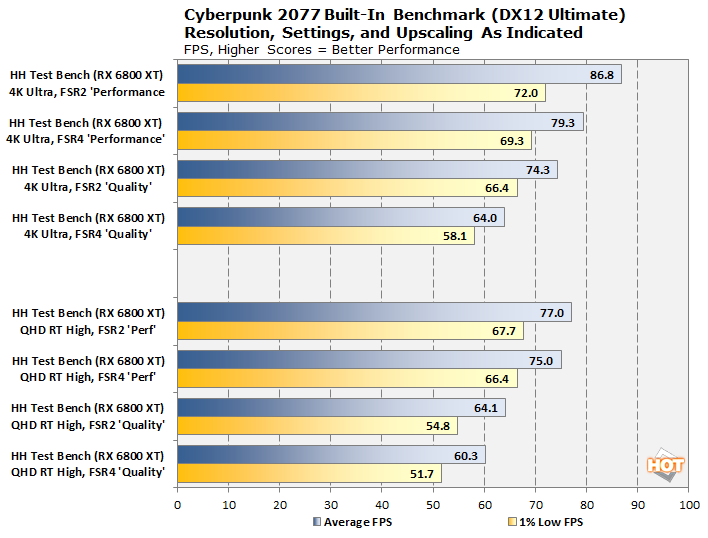
It's a little confusing, but the UHD results are at the top, while the QHD results are below. You're not seeing things; the 4K results are better than the QHD results. That's because RDNA 2 is actually quite bad at ray-tracing. Despite that our settings are relatively modest and the RX 6800 XT is an extremely powerful GPU, enabling ray-tracing has a higher overall performance impact than going up to 4K UHD resolution (2.25x the pixels!)
In every case, FSR2 is faster than FSR4 at the same input resolution. However, the difference isn't that drastic. In fact, in the case of the QHD ray-tracing results, the difference is barely there, as the GPU is so bottlenecked by its meager ray-tracing hardware that it has a lot of compute sitting around idle. The performance gap is larger on the 4K results, as the upscaler works its magic at the output resolution, so naturally the more expensive upscaler (FSR 4.1) costs more at the higher resolution.
Given the extra performance hit, then, is it worth it? One-thousand percent yes. FidelityFX Super Resolution 2.0 (and by extension FSR 3, which is only slightly different in terms of quality) was a perfectly competent upscaler in its day, but it is no longer 2022. Analytical FSR has lots of limitations, such as an inability to handle transparent textures well and significant ghosting problems on moving objects, particularly in the distance. Check out this comparison:

Despite having a lower input resolution ("Performance" vs "Quality"), AMD's newer upscaler provides a clearer image, and it completely avoids the distracting ghosting and artifacting present in the FSR 2 image. It's actually night and day, and it's even clearer in motion. The difference can't really be overstated, and as you can see above, FSR 4.1 Performance is still faster than FSR 2.1 Quality.

That's not to say that FSR 4.1 is flawless, but even in extremely difficult cases it does a lot better than FSR 2. Check out this comparison of a scrap pile on a rooftop. It's a troublesome scenario for upscalers because of all the sharp angles and reflective surfaces. Even FSR 4.1 Quality isn't able to clean up the aliasing, but it looks a hell of a lot better than FSR 2.1 here. Check out the oversharpening on the rivets to the left on FSR 2.1 as well; both upscalers were configured to use 20% sharpening.

In this shot through the haze under the megabuilding that V lives in, you can clearly see that FSR 2.1 has added distracting blue artifacts to the 空きPOD有り sign. The glowing ring over on the left is also slightly smoother, with a less-jagged outer edge, although that's very subtle.
So for our first game, FSR 4.1 requires a very small performance hit for radically improved visuals. I have to say that the performance hit was much smaller than I expected on RDNA 2. The original Optiscaler ports of the leaked INT8 FSR4 model caused huge performance hits, as much as 40%. AMD has clearly done good job tuning the technology for its older GPUs.
AMD FSR 4.1 on Radeon RX 6800 XT In Hogwarts Legacy

Hogwarts Legacy recently got a major bump in sales thanks to the "Malfoid" trend on social media, and that's about all that needs to be said about that. Weird trends aside, this remains one of my favorite games, and much like Cyberpunk 2077, it has a robust ray-tracing implementation but still looks fantastic even without those effects. I didn't test Hogwarts Legacy with ray-tracing, instead choosing to focus on the standard Ultra settings.
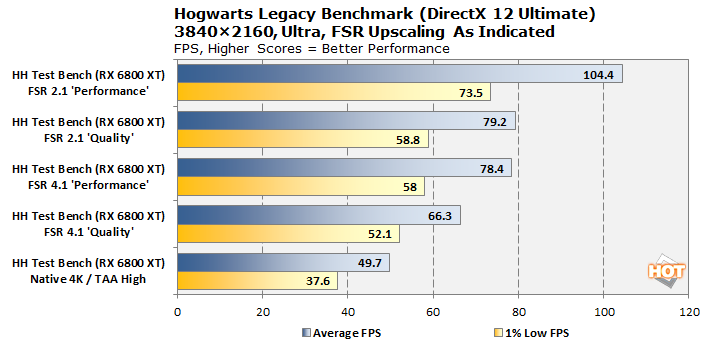
Boy, these RDNA 2 Radeon cards really do like it when a game fits into their Infinity Cache. That FSR 2.1 'Performance' result throws off the math a little; FSR 4.1 increases the VRAM usage just enough that performance takes a major hit, and so FSR 4.1 'Performance' runs about the same as FSR 2.1 'Quality'. FSR 4.1 isn't as clear of a win in this game because the FSR 2.1 implementation is uncharacteristically good, but you can still see major artifacting in places due to FSR 2.1 being very bad at handling particle effects.
The RX 6800 XT struggles a little to play this game smoothly at native 4K, but enabling FSR 4.1 even on 'Quality' mode gives us a huge 33% boost in average FPS. From there you could enable FSR 3.1 Frame Generation and claim 120 FPS or so, if you wanted to. We probably wouldn't. But it's true that 66.3 FPS is eminently playable and that's how I'd recommend playing Hogwarts Legacy on the RX 6800 XT. The extra 19% of frame rate you get from dropping to FSR 2.1 really isn't worth what you lose in terms of image clarity and stability.

There are reasons to to stick with 'Quality', too. While these ML-based upscalers—including both DLSS and XeSS along with this FSR 4.1—are incredibly impressive, they can still only work with what they're given by the game. In the scene above, FSR 4.1 Performance simply doesn't have enough detail to reconstruct the center bar running down the middle of the window. The overall presentation is a little softer, too; compare the foliage in the top left. It still looks quite good in motion, though.

This comparison of TAA High, versus FSR 4.1, versus FSR 2.1 is a little hard to appreciate, especially given the students walking through the scene, but key points of interest are the bars of the cage, the shadowed area under the cage, and the roof tiles at the top of the image, as well as the text on the Hogsmeade street sign. FSR 2.1 is doing a heroic job here compared to how it normally performs, but FSR 4.1 is just cleaner and clearer. I'd argue the FSR 4.1 Quality result is actually more appealing than the 4K native result, as the game's TAA is a little too aggressive and adds unnecessary blur to the image.

This image demonstrates another interesting thing about upscalers which I'll talk more about in a minute. Because you're actually reducing the render resolution as far as the game engine is concerned, effects that take place in screen space—which is a huge portion of modern game visual effects—simply have a lot less data to work with. As a result, you get things like this scene, where the subtle shadow on the door from the metal gate is extremely reduced in 'Quality' mode and completely absent in 'Performance' mode.
I used to recommend Radeon owners to use Intel's XeSS upscaler in Hogwarts Legacy, rather than AMD's own FSR 2 or 3. XeSS has its own problems, but it does a darn sight better than analytical FSR, especially for things like the particles I mentioned earlier, of which there are very many in Hogwarts Legacy. FSR 4.1 is a step better still, though, and it's great that AMD finally brought this option to its long-suffering RDNA 2 customers.
AMD FSR 4.1 on Radeon RX 6800 XT in Crimson Desert

Now, Crimson Desert doesn't support FSR 2 or 3 at all, so I don't have any performance comparisons against the older upscalers in this game. But Crimson Desert is an example of a game that has ray-tracing kernels tightly optimized for AMD's RDNA 2 architecture thanks to the consoles being based on a very similar architecture. So I whacked the game up to Ultra, which enables most of the ray-tracing features, and decided to see if I could make it smooth using FSR 4.1.
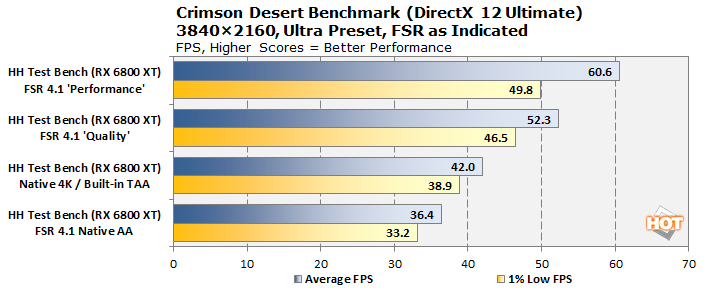
The answer is "yes." Crimson Desert actually looks awesome on the Radeon RX 6800 XT with FSR 4.1. I mean, Crimson Desert kind of just looks awesome no matter what, but it's really a sight to behold. Due to the use of ray-tracing (as discussed earlier in re: Cyberpunk 2077), the performance gap between "Quality" and "Performance" isn't very big here, and so I'd actually recommend just sticking with Quality mode as it provides the best balance of frame-rate gains and image quality.
I also included benchmark results for FSR 4.1 Native AA mode, which uses FSR 4.1 not for upscaling, but as a form of anti-aliasing at native resolution. The performance hit is small but significant; still, it looks incredible, and plenty of console gamers play Crimson Desert at 30 FPS, so if you're fine with it, this is a completely valid option. The heavy GPU load will help mask CPU and I/O-related stutters, too.

Now, I recommended Quality mode over Performance mode by saying that it offered the best balance, and I should elaborate on that, because Performance mode doesn't look bad; that nice screenshot above is in Performance mode. But Crimson Desert has an idiosyncratic lighting system where, the lower your resolution, the more contrast there is in the lights. Check out the right side of the haystack here, as well as the tree in the foreground. This relates to what I was talking about earlier in Hogwarts; the game engine has less resolution to work with, and that affects the shading math.
It's not bad, and some may even prefer the look. However, I don't think it's necessarily what Pearl Abyss intended, so I do think Quality mode makes a nice compromise of performance and accuracy. No matter what you choose the game looks fantastic, though.
AMD FSR 4.1 on Radeon RX 6800 XT in Gears of War E-Day

This one's just a quickie; I wanted to test the latest Gears of War title because it's a bleeding-edge Unreal Engine 5 game that requires ray-tracing and uses Unreal's new MegaLights system. Now, the only upscaler available to this GPU is FSR 4.1, and despite manually selecting a scaling preset, as far as I could tell, it seemed to be doing dynamic resolution scaling with FSR, as no matter what I set the performance was basically the same. I know I wasn't CPU-limited, either, because the game shows you this handy-dandy graph:

Just like the last few Gears of War titles, E-Day gives you some very detailed data about the performance of your system. Unsurprisingly, testing in 4K output with FSR4 was quite demanding for the old Radeon RX 6800 XT, but it's absolutely game for the challenge; an average frame rate of 52.66 FPS despite being on a mix of High and Ultra settings (the "Auto" settings) is pretty good as far as I'm concerned. You could easily turn on Frame Generation and enjoy silky smooth frame delivery in this title. It looks great even with a (configured) 25% input resolution thanks to FSR 4.1, too.
It's perhaps an indictment of the GPU market that the Radeon RX 6800 XT, a graphics card that came out in November of 2020, still holds up this well. I prefer to see it as the natural consequence of the console-focused development cycle of big-budget games. I've no doubt that the Radeon RX 6800 XT will really start feeling its age once new console hardware arrives, as ray-tracing is likely to be 100% mandatory for new games targeting that hardware, and RDNA 2 really can't hack it. Still, for the games of today, it's a perfectly competent performer.
AMD's FSR 4.1 for RDNA 2: A Brilliant Release, But A Bit Late
Which brings me to something I've been thinking about this whole time. It's the end of October 2026. This GPU is coming up on its sixth birthday. FSR 4.1 is absolutely a wonderful present for this card on the eve of its retirement, but I can't help but think this would have been even better if it had come sooner. The Radeon RX 9070 XT launched in March of last year, and FSR 4 came along with it.Certainly AMD didn't have this optimized version ready for older GPUs then, but in August of 2025, AMD leaked the FSR 4 files on GitHub and that version did work on older GPUs. So why did AMD wait so long to release something for its loyal Radeon customers? Any official release would have been better than the radio silence we got for months after the leak.

Don't get me wrong here, FSR 4.1 is brilliant and I think it's a fantastic upgrade for owners of older Radeon cards. If you've played through any of these big AAA graphical showcase games with FSR 2 or FSR 3 upscaling on your Radeon RX 6000 or RX 7000 card, it might be worth revisiting them with FSR 4; it's really that much of an improvement. I just wish AMD had been able to get it out the door a little sooner.

Regardless, there's no point crying over spilled milk. Users of Radeon GPUs going all the way back to 2020 now have a legitimate competitor to NVIDIA's DLSS, and that's excellent. There are limitations; it only works on DirectX 12 games, officially, and if the game implements FSR through direct code integration instead of as an external library (like Warframe), you won't be able to override it. It's still possible to make it work in those games using Optiscaler, but that's a topic for another time.
For now, I'd like to hear what you think. If you have a Radeon GPU, enable the upscaling toggle in your Adrenalin control panel and try it out in some games, then come back and let me know how it went. Also, if you're interested in lower-end GPUs or in RDNA 3 GPUs, let me know that in the comments below, too.